
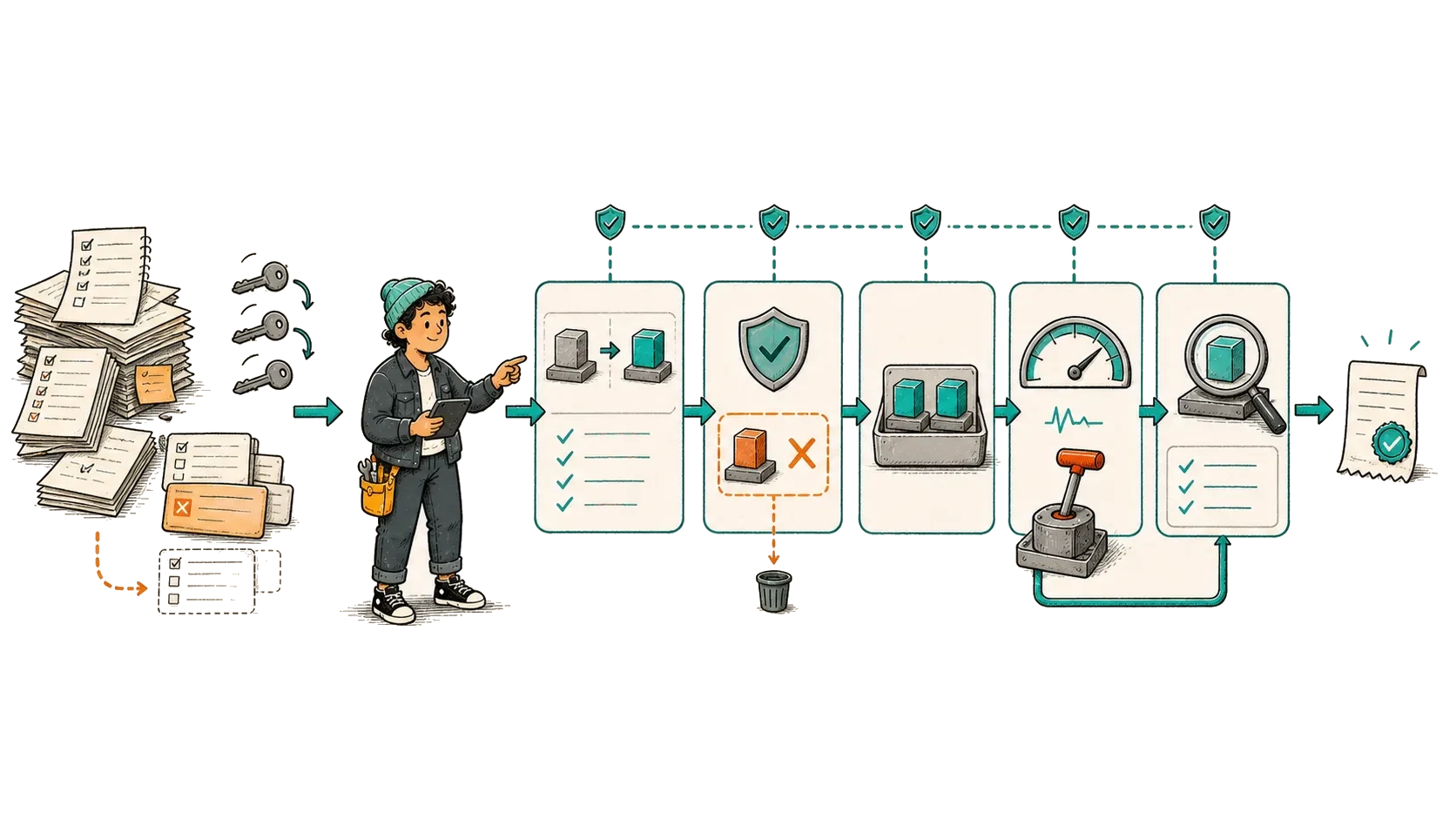
The deployment problem was not that engineers were slow. They had to remember which artifact had passed testing. They also had to reconstruct the correct environment settings before deciding whether the rollout was healthy. None of those decisions lived in one reliable record. Repeating the process manually made a routine release take roughly two hours.
I helped move that workflow into Azure DevOps and reduced the path to roughly ten minutes. The pipeline built one identified artifact and carried it through each environment. Every stage answered a clear question before the release could continue. The speed came from removing repeated reasoning, not from skipping controls.
Map decisions before automating commands
A manual runbook mixes repeatable commands with human judgment. Compiling the application and running the same test suite should produce the same result every time, so the pipeline should own that work. Deciding whether a database change remains backward compatible requires context and an accountable human.
For each stage, I first wrote what it accepts. I then wrote the result it must produce and the condition that should stop it. Finally, I named the person who can approve an exception. Automating an undocumented sequence would have made it faster without making it safer.
I rejected the idea of hiding the whole runbook inside one large script. That design would make a partial failure difficult to locate and would leave a reviewer unsure about what had already changed. Named stages preserve the decision points. They also let the pipeline stop before production access is granted.
| Concern | Pipeline owns | Human owns |
|---|---|---|
| Artifact | Build once and attach an immutable identity to the output. | Approve that exact release candidate. |
| Quality | Run each test layer once at the stage where it adds evidence. | Approve only an exception that is written and reviewable. |
| Target | Bind deployment to a named protected environment. | Authorize production access and choose the release time. |
| Rollout | Apply the Helm change and report Kubernetes progress. | Choose rollback when the result is unclear. |
| Verification | Run a health check and one critical smoke test. A smoke test is a small check that proves the most important path can start and finish. | Decide whether the business needs wider validation. |
Make the delivery contract visible in stages
Stages are useful because they create named evidence boundaries. A production deployment should never rebuild an artifact that passed tests earlier; it should promote the identified artifact. Environment-specific configuration is injected at deployment time from controlled resources, not copied into the repository or typed into a terminal.
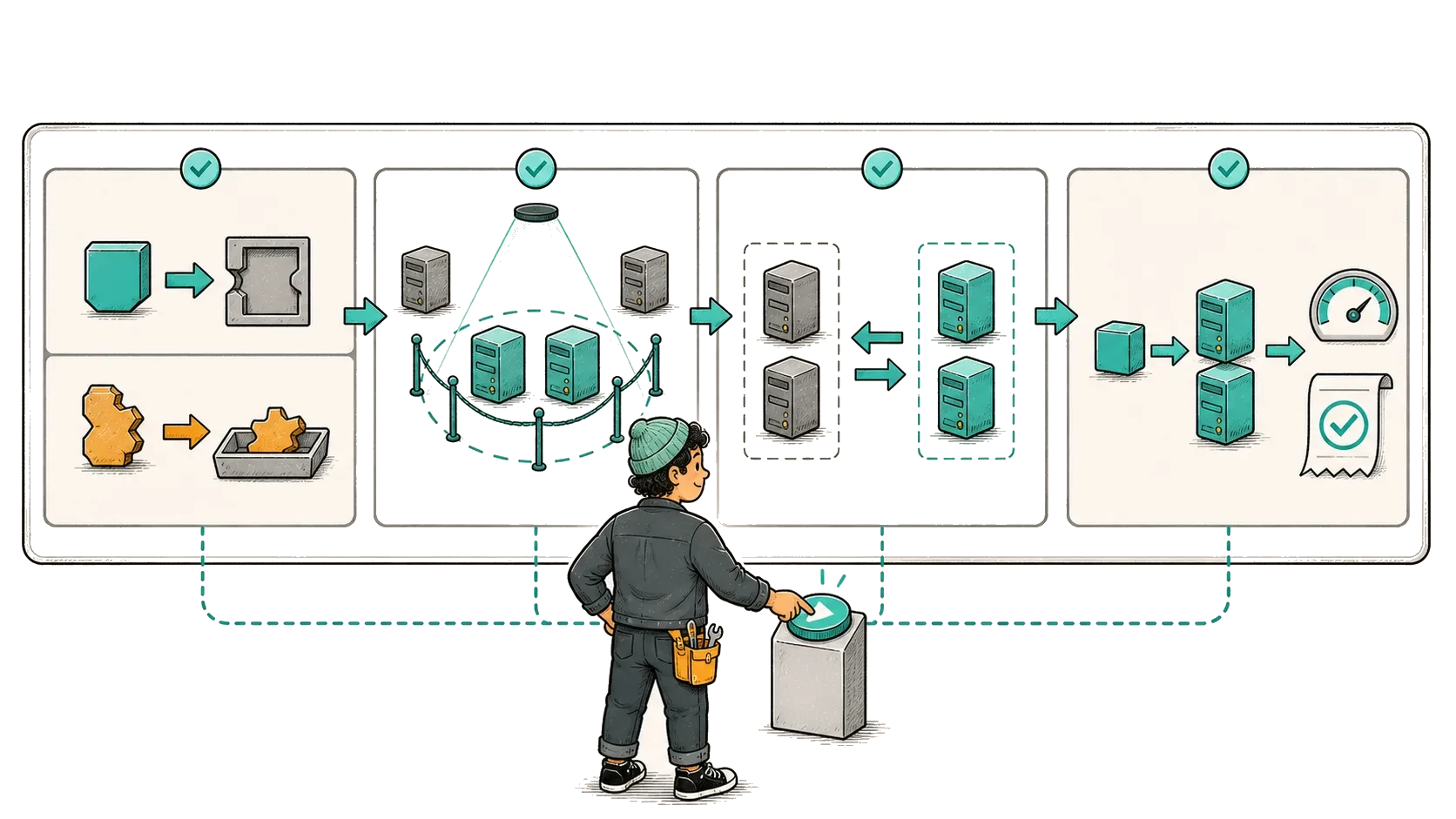
The skeleton below communicates the dependency graph. It is intentionally incomplete: production approvals and checks belong to protected Azure DevOps environment resources, where editing pipeline YAML alone cannot silently remove them.
 Automexia</>YAML
stages:
- stage: Validate
jobs: [unit_tests, integration_tests, security_checks]
- stage: Package
dependsOn: Validate
jobs: [build_once, publish_artifact, render_helm]
- stage: Deploy_Staging
dependsOn: Package
jobs: [deploy_exact_artifact, smoke_test]
- stage: Deploy_Production
dependsOn: Deploy_Staging
environment: production
jobs: [deploy_bounded_change, verify_rollout]
- stage: Verify_Outcome
dependsOn: Deploy_Production
jobs: [journey_check, publish_release_evidence]SourcesMicrosoft Learn
Use gates that answer different failure questions
More tests do not automatically create a safer release. Each gate should rule out a different class of failure. Unit tests protect local decision logic. WireMock and Testcontainers exercise integration behavior with realistic dependencies. Contract tests protect service boundaries. Playwright protects a small number of critical journeys. Re-running identical tests at every stage only increases time without adding evidence.
A gate must also fail clearly. The release record should name the failed check and the exact release that was running. It must also say whether production changed before the failure. A red stage with thousands of ungrouped log lines recreates the same cognitive load as the manual process.
- Fast gate: rejects code that cannot compile or pass its unit tests.
- Dependency gate: starts isolated dependencies and proves that the service can communicate with them.
- Contract gate: proves that a new build still speaks the interface expected by existing callers.
- Journey gate: runs a small synthetic payment through the behavior users depend on.
- Deployment gate: shows the exact image and configuration change before promotion.
Keep production authority outside the pipeline file
A contributor who can edit YAML should not automatically gain the authority to deploy to production. I attach approval rules to a protected Azure DevOps environment. The environment is a separately controlled deployment target, so its policy does not live in the pipeline file. A pull request can change the workflow, but it cannot silently remove the policy that protects production.
The service connection is scoped to the environment it must change. Secrets stay in protected storage and appear in the pipeline only as references. An approval is useful when the reviewer can see the exact artifact and configuration difference. Without that evidence, the approval only adds waiting time.
| Risk | Technical control | Evidence retained |
|---|---|---|
| Wrong environment | Use a protected environment with a scoped service connection. | Record who requested and approved the target. |
| Wrong artifact | Promote an immutable digest between stages. | Link the digest to its source commit. |
| Concurrent releases | Allow only one production deployment at a time. | Show which run waited or was replaced. |
| Secret exposure | Read secrets from a protected store and mask logs. | Record the secret reference, never its value. |
| Policy bypass | Keep mandatory checks outside editable YAML. | Retain the approval history. |
Verify the image before checking the rollout
An image tag such as release-latest can move to different content. An image digest is derived from the image content and identifies one exact image. The pipeline should therefore carry the approved digest into production and compare it with the image declared on the Deployment.
Both commands below are read-only and require namespace-scoped access. The image comparison happens before rollout validation because a healthy rollout of the wrong artifact is still a failed release.
Read the exact image declared on the Deployment
Ask Kubernetes for the image assigned to the application container. In a multi-container pod, the container name must be explicit so a sidecar image is not compared by mistake.
Automexia Ubuntu-24.04
kubectl -n '<namespace>' get 'deployment/<service>' -o jsonpath='{.spec.template.spec.containers[?(@.name=="<container>")].image}'<registry>/<service>@sha256:<deployed-digest>Wait for Kubernetes to finish the rollout
Only after the digest matches should the pipeline wait for the Deployment rollout. The timeout must reflect how long this service normally needs to become ready.
AutomexiaUbuntu-24.04kubectl -n '<namespace>' rollout status 'deployment/<service>' --timeout='<agreed-timeout>'deployment "<service>" successfully rolled outSourcesKubernetesKubernetes
Design rollback and partial failure before promotion
Retries are safe for reads and for steps that are genuinely idempotent. An idempotent operation reaches the same state when it is repeated, so a lost response does not turn the retry into a second change. Retries are dangerous when a write may have succeeded but its response was lost. Before repeating a deployment task, the pipeline reads the current external state and checks whether the declared artifact is already active.
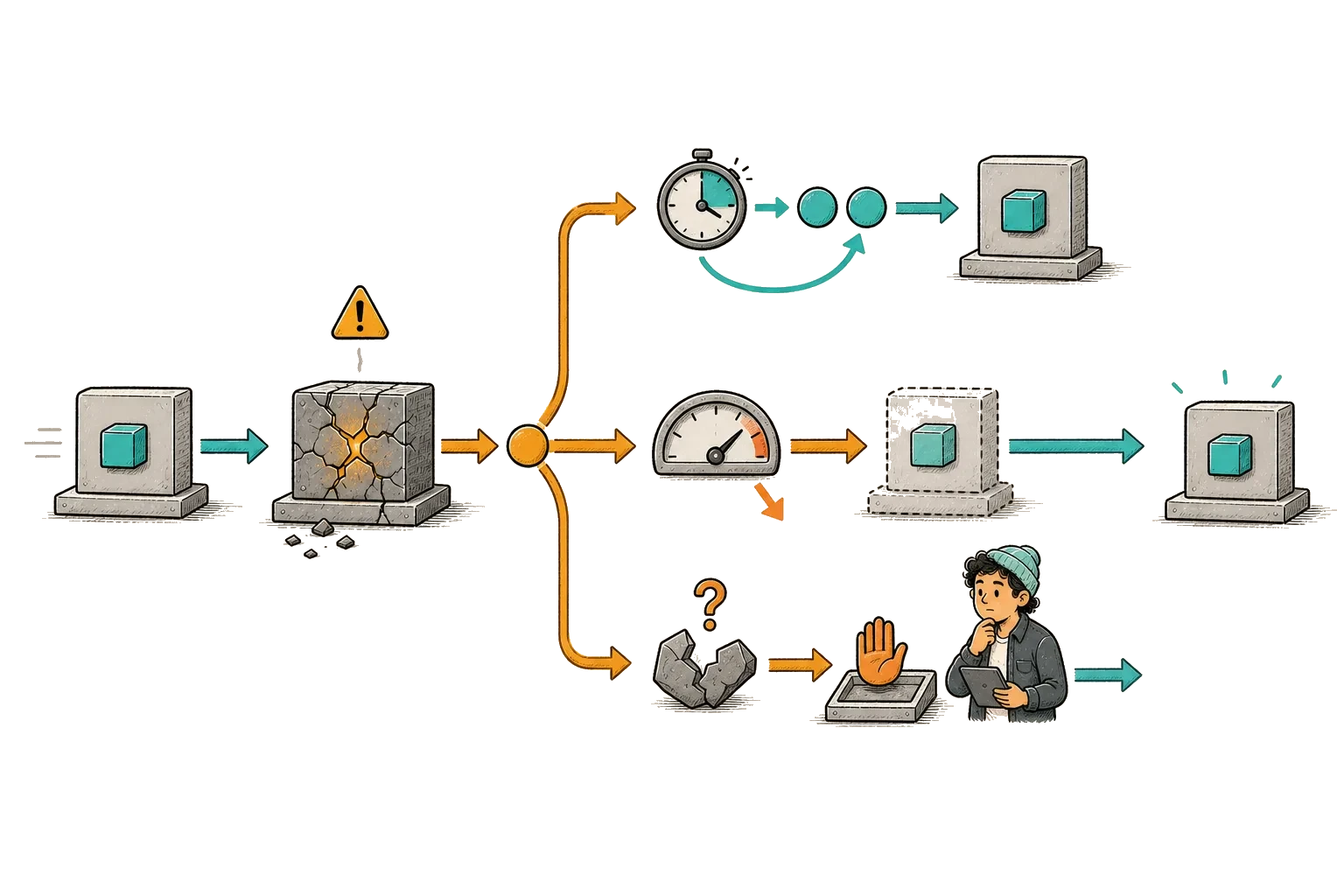
Helm keeps release revisions, but rollback is not a universal undo. A database migration may have changed data that the old application cannot read. I therefore expand the schema before using new fields and postpone removal until the old release is outside the rollback window. The same compatibility question applies to messages and external side effects.
- Retry: a read-only step is usually safe to repeat. A write must be idempotent or protected by an idempotency key before the pipeline retries it.
- Rollback: when the previous application and configuration remain compatible with current state.
- Compensate: when an external side effect cannot be erased but an explicit counter-action exists.
- Stop for a human: when the pipeline cannot prove what state production is in.
SourcesHelmKubernetes
Measure the result without overclaiming it
The result I can substantiate is deployment duration: approximately two hours manually and approximately ten minutes through the automated path, a reduction of roughly 92 percent. That improvement matters because feedback arrives in the same working session and the release no longer depends on reconstructing a long sequence from memory.
I do not have a publishable baseline for change-failure rate, so I will not claim a reliability improvement by percentage. The next version should measure how long each release waits and how long it executes. It should also record when a person intervenes or a post-deployment incident follows.
Automation earned trust because it made the release state easier to inspect. The speed was the consequence.
Key takeaways
- Automate deterministic mechanics while keeping accountable judgment explicit.
- Build once and promote the same immutable artifact through every environment.
- Protect production with resource-owned permissions and checks outside editable YAML.
- Retry only after proving what the previous attempt changed. Stop when production state is unclear.
- Report the measured duration improvement without inventing reliability percentages.
References & revisions
Primary documentation supports the technical guidance below.
- Key Azure Pipelines concepts Microsoft Learn
- Approvals and checks Microsoft Learn
- Manage security in Azure Pipelines Microsoft Learn
- Helm upgrade and rollback Helm
- Kubernetes Deployments Kubernetes
- Container images and immutable digests Kubernetes
- kubectl rollout status reference Kubernetes
Revision history
Rebuilt the article as a measured deployment case study. Image and rollout checks now use compact, copyable Automexia captures with separate sanitized output.